

To link a new passport or national ID to EU settled status, the UKVI account is updated at gov.uk/update-uk-visas-immigration-account-details. The update takes 10 minutes for same-name, same-nationality renewals, or up to 4 weeks for name or nationality changes. Failing to update risks airline boarding refusals because electronic carrier checks fail when the travel document does not match the linked document.
Your EU settled status is linked to the specific passport or national ID card you used when applying. When that document is renewed, expires, or changes, the link must be updated or you risk being refused boarding by airlines and ferry operators. This guide covers the simple update process, why it matters now more than ever, and the common problems.
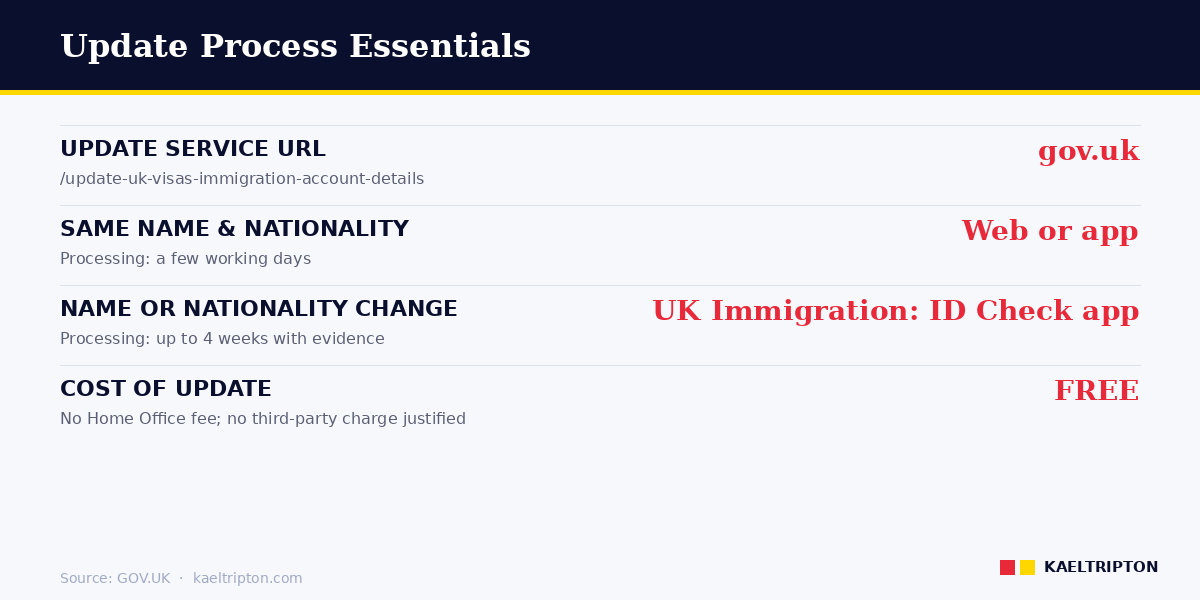
When you renew a passport or national ID, update your UKVI account at gov.uk/update-uk-visas-immigration-account-details. Free, takes 10 minutes online for same-name/nationality renewals, up to 4 weeks through the UK Immigration: ID Check app for name or nationality changes. Failing to update risks airline boarding refusals - electronic carrier checks fail when the travel document doesn’t match the linked document. |
The one-sentence rule
If you renew or replace the passport or national ID card you used to apply to the EU Settlement Scheme, you must update your UKVI account to link the new document. The update takes 10 minutes online at gov.uk/update-uk-visas-immigration-account-details. Failing to update can mean airlines refuse boarding because the travel document does not match the document on your immigration record.
The Home Office has explicitly warned that carriers may deny boarding where the travel document being used does not match the document linked to the UKVI account. This is a new enforcement pattern that started materialising in late 2024 as the digital immigration system matured.
Why updating matters in 2026
Until around 2023, mismatches between the passport used to travel and the passport linked to EUSS status were sometimes overlooked at borders because physical document checks still dominated. From late 2024 onwards, carrier checks have become fully electronic: airlines run your passport through Home Office systems that return either a “Valid Permission to Travel Found” message (boarding OK) or a refusal.
If your UKVI account is linked to your old passport but you’re travelling with your new one, the electronic check fails. The airline’s system says you don’t have permission, even though you actually do. They refuse to board you. Sorting it out requires either travelling on the old passport (which may have been handed back after renewal) or updating the account urgently (may take days to process).
The fix is to update before travel, not during a crisis at the gate. The update usually processes within a few working days.
When you need to update
Update your UKVI account whenever any of these apply:
- You renew your passport. Same country, same name - just a new document number and expiry date. Most common case.
- You renew or change your national ID card. Particularly relevant for EU citizens who used an ID card rather than a passport for their original EUSS application.
- You change nationality. You acquired a new citizenship and now hold a different passport. The process is more complex - may require Home Office intervention.
- You change your name. Marriage, divorce, deed poll. Update name first, then link the new document reflecting the new name.
- You change your address, phone number or email address. Contact details matter for Home Office correspondence - auto-extension notifications, auto-conversion emails, requests for information.
- You change your appearance significantly. A new photo can be added if your current photo no longer identifies you reliably.
You cannot update the document or name while a visa application is pending. If you’re awaiting a decision - say on auto-conversion to settled status - wait until it’s decided before updating. In the meantime, travel on the old document that’s linked.
How to update - step by step
Go to gov.uk/update-uk-visas-immigration-account-details. You need the details you used to sign in to your UKVI account - typically the original passport or ID card number and date of birth.
Process (same name and nationality):
- Sign in with your existing UKVI account credentials.
- Select “update your identity document”.
- Take a photo of your new passport or ID card using a smartphone or upload a scan from a computer.
- The system may ask for additional verification - a selfie, a security code sent to your registered phone or email.
- Confirm the new details are correct.
- Submit.
Processing takes a few working days for straightforward updates. You receive email confirmation. The old document remains in your account history but the new one becomes the primary link.
Process for name or nationality changes
If your new document is in a different name (for example, marriage) or a different nationality, the process is more involved. Since early 2025, you can use the UK Immigration: ID Check app to complete the update remotely. This is a different app from the one used to apply to the EUSS originally - check the name carefully.
Steps:
- Download the UK Immigration: ID Check app from the App Store or Google Play.
- Scan your new identity document using the app’s biometric reader.
- Take a selfie for facial matching.
- Upload evidence of the name change if applicable - marriage certificate, decree absolute, deed poll.
- Submit through the app.
For name changes, expect longer processing - up to 4 weeks. The Home Office reviews the evidence and updates the account accordingly. In some complex cases, you may be asked to post the original documents (marriage certificate, deed poll) by recorded delivery.
Scenario - the renewed passport before holiday
Consider a realistic case. A French administrator in Cambridge received her EUSS settled status in 2020 using her then-current French passport. In January 2026 she renews her French passport - new number, new expiry, same name. She’s planning a March 2026 holiday to Nice.
In February she goes to gov.uk/update-uk-visas-immigration-account-details. Signs in with her old passport number. Takes a photo of the new passport with her phone. Submits. Email confirmation arrives 3 days later: the new passport is linked.
She travels in March with the new passport. At Stansted the electronic gate reads her new passport, the Home Office system returns “Valid Permission to Travel Found”, she clears immigration in 90 seconds.
Teaching point: the update before travel is cheap insurance. Three days of processing vs the potential disaster of being refused boarding. Do it as soon as the new passport arrives, not the week before travel.
Scenario - the name change on marriage
A second case. A Spanish IT worker in Glasgow marries her British partner in 2025 and takes his surname. She holds settled status under her maiden name. Her Spanish passport is renewed in 2026 showing the new surname.
She uses the UK Immigration: ID Check app to update. Scans the new passport, uploads her marriage certificate as evidence of the name change, submits. Processing takes 3 weeks. Her UKVI account now shows her married surname and links to the new Spanish passport.
Her old share codes generated before the update are still valid for 90 days from generation but show the old name. After the update, new share codes show the new name. Employers and landlords can cross-reference the old and new names via her marriage certificate if questions arise during the transition period.
Teaching point: the update covers name, nationality and document changes in a single process. Upload the supporting evidence (marriage certificate in this case) with the document change, not as a separate application.
Common problems
Photo rejected. The ID document photo must meet specific rules - well lit, no glare, full document visible, no fingers covering text. Using a smartphone and photographing on a plain dark surface usually works better than scanning on a flatbed scanner.
“Issuing country” confusion. The issuing country is your country of nationality, even if the passport was issued at the national embassy in the UK. Don’t enter “UK” as the issuing country of a Spanish passport issued in London - it should be Spain.
Refugee travel documents. These cannot currently be linked to UKVI accounts. If you hold a refugee travel document, you cannot complete the standard update process. Travel documents remain valid under Home Office Carrier Guidance, but the digital link is not yet supported. Contact the EU Settlement Scheme Resolution Centre for specific guidance.
Account recovery issues. If you can’t sign in because your email or phone has changed since you set up the account, use the account recovery service at update-your-details.homeoffice.gov.uk/account-recovery/help.
Waiting longer than 4 weeks. If a standard update hasn’t been confirmed 4 weeks after submission, contact the EU Settlement Scheme Resolution Centre. Delays beyond this are unusual and warrant chasing.
Identity cards after 31 December 2025
EU national ID cards remained valid for UK entry during a transitional period after Brexit. From 31 December 2025, most EU national ID cards are no longer accepted for UK entry - a passport is required. Exceptions apply for specific categories of EUSS holders who registered their ID card during a defined window.
If you previously travelled on an EU national ID card, you need to travel on a passport from 1 January 2026. Link the passport to your UKVI account if you haven’t already. The3million (an EU citizens’ advocacy body) maintains detailed current guidance on the ID card transition.
Related guides
- Settled Status Login UK 2026
- EU Settled Status Share Code 2026
- EU Settlement Scheme App 2026
- EU Settled Status Auto-Extension 2026
Disclaimer
This guide reflects Home Office UKVI account-management services as published on GOV.UK as of April 2026. Processes and apps change periodically. Always use the official GOV.UK domain and official Home Office apps - third-party sites offering to update your UKVI account are fraudulent. This article is not legal advice.
Frequently asked questions
Do I need to update my UKVI account when I renew my passport?
Yes. Your EU settled or pre-settled status is linked to the specific passport or ID card you used when applying. When you renew, update the account at gov.uk/update-uk-visas-immigration-account-details. Update before you travel - electronic carrier checks fail if the travel document doesn’t match the linked document, and airlines can refuse boarding.
How long does the UKVI account update take?
A few working days for a straightforward same-name, same-nationality document renewal. Up to 4 weeks for name or nationality changes that require supporting evidence. If you’re waiting longer than 4 weeks, contact the EU Settlement Scheme Resolution Centre.
Can I travel while my UKVI account update is pending?
Yes, using the old passport or ID card that’s still linked. Don’t travel on the new document until the link is updated. If the old document has expired and you must travel on the new one before the update processes, contact the Resolution Centre urgently for guidance.
Is the UKVI account update free?
Yes, completely free. No payment required at any stage. Third-party sites offering to process your update for a fee are fraudulent. Only use the official GOV.UK domain at gov.uk/update-uk-visas-immigration-account-details or the official UK Immigration: ID Check app.
What if I changed my name after marriage?
Use the UK Immigration: ID Check app (different from the EUSS application app - check the name). Scan the new passport showing your married name, upload your marriage certificate as evidence of the name change, and submit. Processing takes up to 4 weeks. New share codes generated after the update show the new name.
Can I still use an EU national ID card to enter the UK?
Most EU national ID cards are no longer accepted for UK entry from 31 December 2025. You need a passport. Link the passport to your UKVI account before travelling. Some specific categories of EUSS holders who registered ID cards during a defined transitional window have ongoing recognition - check the3million’s current guidance or the Resolution Centre.
What if I can’t sign in to my UKVI account to update it?
If your registered email or phone has changed and you can’t receive the security code, use the account recovery service at update-your-details.homeoffice.gov.uk/account-recovery/help. Provide alternative identity evidence. Recovery can take days to weeks depending on the complexity of your case.
Sources
- GOV.UK - Update your UK Visas and Immigration account details
- GOV.UK - eVisas: update your UKVI account
- Home Office - UK Immigration: ID Check app
- Home Office - Carrier Guidance (section 2.3 on immigration document verification)
- Home Office EUSS Border Force Guidance (30 December 2025)
- the3million - guidance on updating digital status and ID card transition


