

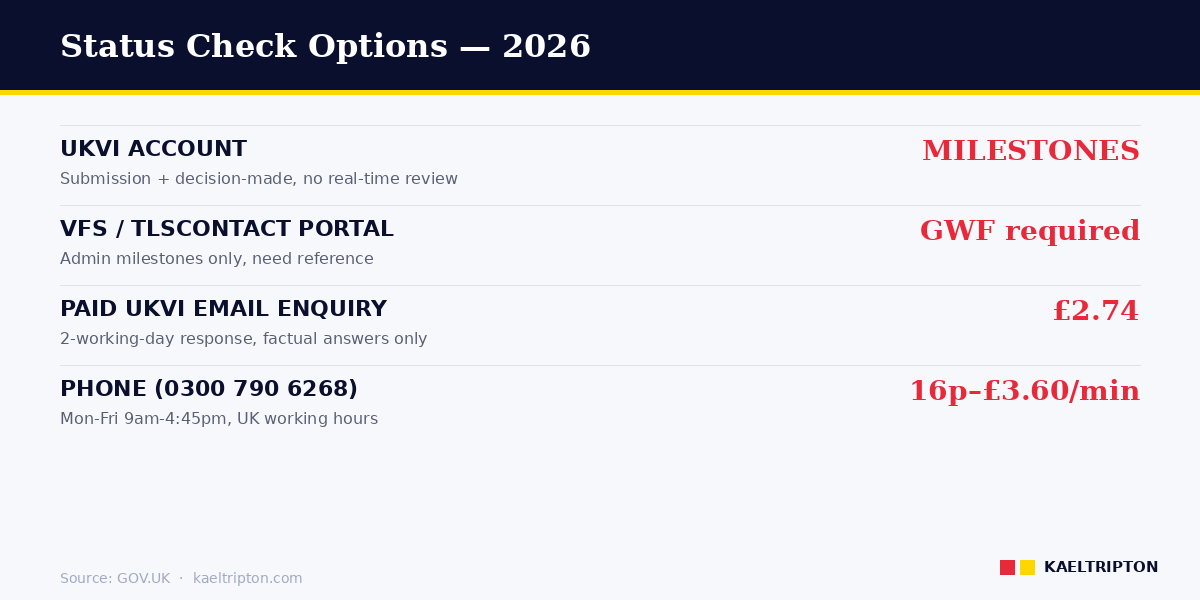
UK visa application status is checked through a UKVI account, the VFS Global or TLScontact partner portal, or a paid UKVI enquiry service. The paid email enquiry costs £2.74 per enquiry, with responses in up to two working days. These tools confirm administrative milestones only, not substantive case progression.
The UK does not run a public real-time visa tracker. What exists is a set of limited tools - a UKVI account showing submission and decision milestones, partner portals run by VFS Global and TLScontact, and a paid enquiry service - each with specific uses. This guide covers what each tool actually tells you and when to use which.
The UK doesn’t run a real-time visa tracker. What you actually have is: a UKVI account showing submission + decision-made milestones, VFS/TLScontact partner portals for admin milestones (both need your GWF reference), and a paid UKVI enquiry service at £2.74 per email for factual clarification after standard processing times. Don’t contact UKVI within the standard window - they won’t provide information. |
A UK visa application is tracked in one of two systems depending on where it was lodged. Out-of-country applications are processed through a commercial partner (VFS Global, TLScontact, or in a few jurisdictions a local equivalent) and the status is visible in that partner's portal. In-country applications are processed through UKVCAS for biometrics and through UKVI direct for the decision. Both routes generate a reference number: the GWF (Global Web Form) number for out-of-country applications, or the Unique Application Number (UAN) for in-country applications. Standard published service windows range from three working weeks for a visit visa to several months for some settlement applications; the clock starts at biometric submission, not at the date of payment.
UK visa fees: key facts (checked 16 October 2026) Current Home Office fees (most rose on 8 April 2026). Fees are per person and paid when you apply; the health surcharge is paid on top for each year of the visa.
|
The short answer on status checking
You can check UK visa application status through your UKVI account for digital submissions, the VFS Global or TLScontact partner portal if you applied from overseas, or by paid enquiry to UKVI if you need clarification beyond standard milestones. None of these shows substantive case progression - they confirm administrative stages only. You need your GWF reference number (for overseas applications) or case ID to locate the file. Passport number alone is not enough.
GOV.UK’s Visa processing times page sets the standard: UKVI does not provide information on the status of your application if it is still within the current published processing time. You only contact them once you’re beyond the service standard.
The UKVI account - what it shows
If you submitted a UK visa application digitally using the UK Immigration: ID Check app, you have a UKVI account tied to that submission. The account is the primary status-check tool. It shows:
- Confirmation your application has been submitted.
- Confirmation when UKVI has reached a decision (“Decision made” - but not the outcome).
- After approval, the linked eVisa record replacing any physical vignette sticker.
The UKVI account does not show estimated completion dates, internal review stages, or case-officer comments. “Decision made” means UKVI has finished reviewing your case - it does not tell you whether you’ve been approved or refused. The outcome arrives separately, by email and through the partner visa application centre if you applied overseas.
Reference numbers - which one you need
Your application reference number is the key to any status check. Different reference formats exist:
| Reference type | Format | Where you find it |
|---|---|---|
| GWF number | Begins “GWF” followed by 9-10 digits | Overseas applications. In your confirmation email, payment receipt, UKVI account. |
| Unique Application Number (UAN) | 16-digit number | On emails and letters from UKVI. |
| Case ID | 8-digit number | On correspondence from the Home Office. |
| Payment Reference Number | Begins “AG” followed by digits | On payment receipts. |
| Biometric Residence Permit (BRP) | Card number (if held pre-2024) | Older applicants; most BRPs expired end-2024, replaced by eVisa. |
Save these somewhere accessible the moment you submit. Retrieving them later from Home Office systems requires the same reference you’re trying to find - a circular problem that delays many status checks.
VFS Global and TLScontact partner portals
If you applied from outside the UK, you submitted biometrics at a commercial partner - either VFS Global or TLScontact, depending on your country. Both run their own tracking portals that show administrative milestones:
- Application received by the partner.
- Documents transferred to UKVI.
- Decision returned from UKVI to the partner.
- Passport returned to applicant (collection or courier).
These portals do not show the UKVI-side review. They show only the administrative movement of your file through their side of the process. A file can sit at UKVI for two weeks with nothing changing on the VFS portal - that’s normal, not a delay signal.
Sign into VFS Global at vfsglobal.com/uk-en-gb or TLScontact at tlscontact.com using the account credentials created when you booked your appointment. Use your GWF number to look up the file.
The paid UKVI enquiry service
For specific questions beyond standard milestones - “is my case within service standard?”, “has UKVI received additional documents I sent?” - UKVI runs a paid enquiry service. An email enquiry costs £2.74 per enquiry (as of April 2026). Responses take up to two working days.
Phone enquiries to UKVI on 0300 790 6268 cost between 16p and £3.60 per minute. The service is available Monday to Friday, 9am to 4:45pm (to 4:30pm on Fridays). Calls from outside the UK use +44 (0)203 875 4669 at similar rates.
The paid enquiry service will only confirm administrative milestones and service-standard position. Case officers will not discuss your personal circumstances, review progress, or likely outcome over the phone. Using the service before your standard processing time has elapsed is unlikely to yield useful information - GOV.UK explicitly states UKVI won’t provide status details within the standard window.
Standard processing times - when to start worrying
Most overseas UK visa applications are processed within these standard windows (from biometric enrolment at the partner centre, not from online submission):
- Standard service: 3 weeks (15 working days) for visit visas; 3 weeks to 3 months for work and family visas depending on complexity.
- Priority service (+£500): target 5 working days.
- Super Priority service (+£1,000): target next working day.
In-country applications run slower: 8 weeks or longer is normal for extensions and settlement applications. UKVI updates published processing times periodically based on current application volumes.
If your application passes the published processing time without decision, that’s when you contact UKVI. Before that point, status-check activity generates no useful information and may distract UKVI staff unnecessarily.
What “Decision Made” actually means
The single most misread status. “Decision Made” appearing on your UKVI account or VFS portal tells you UKVI has reached an outcome. It does not tell you which way. The outcome follows:
- By email, usually within 24 hours.
- Through your UKVI account, which updates to show the eVisa (approval) or a refusal letter (refusal).
- At the VFS or TLScontact centre, where you collect your passport.
If “Decision Made” has appeared but no email has arrived after 48 hours, check your email spam folder. If nothing, contact the partner centre - they receive the decision document first and pass it on.
Edge case - renewing passport during application
If you renew your passport after submitting a visa application but before the decision, the Home Office needs to know. Update your UKVI account with the new passport number immediately. Status checking will show “passport details updated” - a separate milestone from the underlying visa decision. Failing to update the passport can mean the issued eVisa is linked to an invalid document.
Edge case - Home Office requests additional documents
If UKVI needs more information, the request usually comes by email via your UKVI account notification. It can also come through the VFS or TLScontact centre by email or SMS. The status on the portal may not change obviously - the tell is the request itself rather than a status flag.
Respond promptly. UKVI typically gives 10 to 28 working days for additional documents. Non-response after the deadline results in a decision made on existing evidence - usually refusal.
When the Home Office delays - what to do
If your application is beyond published processing time and you’ve had no communication:
- Check published processing times at gov.uk/guidance/visa-processing-times-applications-outside-the-uk. They update regularly.
- Confirm your application’s milestone status on VFS/TLScontact or your UKVI account. Was biometric enrolment recorded? Is there a “transferred to UKVI” milestone?
- Submit a paid email enquiry to UKVI with your GWF and application date. Responses within two working days in most cases.
- Consider professional advice if delay is severe (over 6 months for standard visit applications). IAA-regulated immigration advisers can escalate where appropriate.
Related guides
- UK Visitor Visa 2026: Tourist Visa Application Guide
- UK Visa from India 2026: Application Guide
- How to Apply for a British Visa 2026
- Great Britain Visa 2026: Entry Requirements
Disclaimer
Processes and fees in this guide reflect Home Office and UKVI practice published on GOV.UK as of April 2026. Enquiry fees and phone rates are set by UKVI and change periodically. Always check the current position at gov.uk/guidance/visa-processing-times-applications-outside-the-uk. This article is not legal advice.
Tracking via VFS Global, TLScontact, or UKVCAS
For out-of-country applications, the application service provider used at the Visa Application Centre is also the tracking provider. VFS Global handles the largest share of UK visa centres worldwide. TLScontact operates the UK Visa Application Centres in a smaller number of countries, primarily in Europe and parts of Africa. Inside the UK, UKVCAS (run by Sopra Steria) handles biometric enrolment and document upload for switching and extension applications.
The VFS Global tracker is found at VFS Global track your application. The applicant enters the reference number (the GWF number, which appears on the application confirmation email and on the appointment receipt) together with the date of birth. The portal returns a status string such as "application received", "application in progress at the Visa Application Centre", "documents dispatched to the UK Decision Making Centre", "decision made", or "documents on their way back to the Visa Application Centre".
One common point of confusion is that the VFS-displayed status often lags behind the actual Home Office decision. VFS only updates the public status when the physical documents (passport plus, where relevant, the decision letter and vignette) arrive back at the Visa Application Centre. The decision itself may have been taken several working days earlier. This is why applicants sometimes receive an email from UKVI saying "a decision has been made" while the VFS portal still shows "in progress". The email is authoritative; the portal lags. If the application has been with the decision-making centre for materially longer than the published service standard for that route, the escalation channel is the GOV.UK contact UKVI form at GOV.UK: contact UKVI inside or outside the UK, citing the GWF number and the date biometrics were submitted. Verify the current escalation channels on GOV.UK.
What each status message means
The status strings returned by the VFS, TLScontact, and UKVI systems follow a predictable sequence. Understanding what each one means and the typical timing between transitions helps applicants distinguish a normal progression from a stalled application.
"Application received" means the Visa Application Centre has logged the application package and has linked it to the applicant's biometric data. This status appears within hours of the biometric appointment. "Application sent to UK Visas and Immigration" or "documents dispatched to the UK Decision Making Centre" means the physical and digital file has left the centre and is in transit to the relevant Home Office decision-making hub. This usually appears within a few working days of biometrics, depending on courier scheduling.
"Decision has been made" means the case has been adjudicated by a Home Office caseworker. It does not yet indicate the outcome; the result (grant or refusal) is in the decision letter accompanying the returned documents. "Documents on their way back" means the physical package, including the passport, has left the decision-making hub and is in transit back to the Visa Application Centre for collection or courier delivery. The applicant should not travel during this window, as the passport is in the postal system. Verify on GOV.UK before assuming a status string reflects an irrevocable position; UKVI status terminology has shifted at intervals over the past two years and the canonical glossary is the GOV.UK visa processing times page.
Frequently asked questions
How do I find my GWF number for a UK visa application?
The GWF (Global Web Form) number is on the application confirmation email sent when the online application was submitted, on the appointment receipt issued by the Visa Application Centre, and on any subsequent UKVI correspondence. It begins "GWF" followed by nine or ten digits. In-country switching applications use the Unique Application Number (UAN) instead, which is shown after submission of the online form.
How long after biometrics is a UK visa decision usually made?
The published service standard varies by route. Standard Visitor applications target three working weeks from biometrics. Skilled Worker out-of-country targets three working weeks. Settlement (family route) targets 12 weeks. ILR (settlement after long residence) is published with longer windows. Verify the current standard for the specific route on GOV.UK before assuming a delay.
What does "decision made" mean on a UK visa application?
It means a Home Office caseworker has adjudicated the application. The outcome itself is not visible on the portal; it is in the decision letter accompanying the returned passport. A decision-made status is followed within a few working days by a documents-dispatched status as the physical file is couriered back to the Visa Application Centre.
Can I track a UK visit visa application?
Yes, via the same VFS Global or TLScontact tracker used for any out-of-country application. The GWF number from the application confirmation email plus the applicant's date of birth are required. Visit visa decisions are typically returned within the three-working-week service standard, often faster.
How do I check my UK visa application status?
Sign into your UKVI account at GOV.UK using the credentials from your application. For overseas applications, also check VFS Global or TLScontact (whichever you applied through) using your GWF reference. Neither shows real-time review progress - only administrative milestones like submission, transfer to UKVI, and decision made.
Is there a real-time UK visa tracker?
No. UKVI does not operate a public real-time tracking portal. The UKVI account and partner portals (VFS Global, TLScontact) show administrative milestones, not live case progression. This is a deliberate Home Office policy, not a technical limitation.
What does “Decision Made” mean on my application?
It means UKVI has reached an outcome but does not tell you whether you’re approved or refused. The result follows separately: by email within 24 hours, through your UKVI account, and at your visa application centre when your passport is returned.
Can I check my UK visa status by passport number?
No. UKVI and partner portals require your GWF reference number (or UAN, or case ID) to locate your application. Passport number alone will not work. Save your GWF reference immediately on submission.
How long before I should worry about delays?
Standard UK visit visa processing is 3 weeks from biometric enrolment. For work or family visas, 3 weeks to 3 months is normal. Don’t contact UKVI within the standard processing window - they will not provide information. Wait until you’re past the published time.
How much does a paid UKVI enquiry cost?
An email enquiry to UKVI costs £2.74 per query (as of April 2026), with responses in up to two working days. Phone enquiries on 0300 790 6268 cost 16p to £3.60 per minute. Calls from outside the UK use +44 (0)203 875 4669 at similar rates.
What reference numbers do I need ready for enquiries?
GWF reference (overseas applications, begins “GWF” followed by digits) or Unique Application Number (16 digits on UKVI correspondence). Also useful: payment reference beginning “AG”, case ID (8 digits), and Immigration Health Surcharge reference if applicable. Gather these before contacting UKVI.
Sources
- GOV.UK - Visa processing times: applications outside the UK
- GOV.UK - View and prove your immigration status (UKVI account)
- GOV.UK - Contact UKVI inside the UK
- Home Office Written Statement HCWS1361 (25 February 2026) - eVisa transition and digital status
- VFS Global UK tracking portal - vfsglobal.com/uk-en-gb
- TLScontact tracking portal - tlscontact.com


